
An acknowledgment is the receipt a donor gets after a gift: it states the gift amount, the date, the fund, and the tax-deductible amount. Some are sent for you and the rest wait in the acknowledgments queue until someone sends them.
Which gifts are receipted automatically
- A one-time gift on your public donate page — the receipt is emailed to the donor as soon as the payment goes through, and the gift is marked acknowledged. It never appears under Needs receipt unless that email failed to send.
- A recurring (sustainer) gift — only the first installment is receipted automatically. Every later installment lands in the queue with a Recurring badge.
- Everything else waits in the queue — a check, cash, or in-kind gift you record by hand, a donation added to a ticket order online or at the box office, and a ticket refund converted to a donation. Recording a gift by hand never emails the donor.
A donation added to a ticket order is not left with nothing: the buyer's ticket confirmation email shows the donation as its own line, and adds a "Donation receipt" box with your Donation Receipt Statement when you have one saved. It still waits in this queue for a proper acknowledgment.
Before you start
Venue Admin with the Donor data permission (set on the Team page). The venue owner always has it. Without it the queue loads empty and the actions fail. Box-office staff can't open this page.
The acknowledgments queue
Go to AdminVenuesFundraisingAcknowledgments.
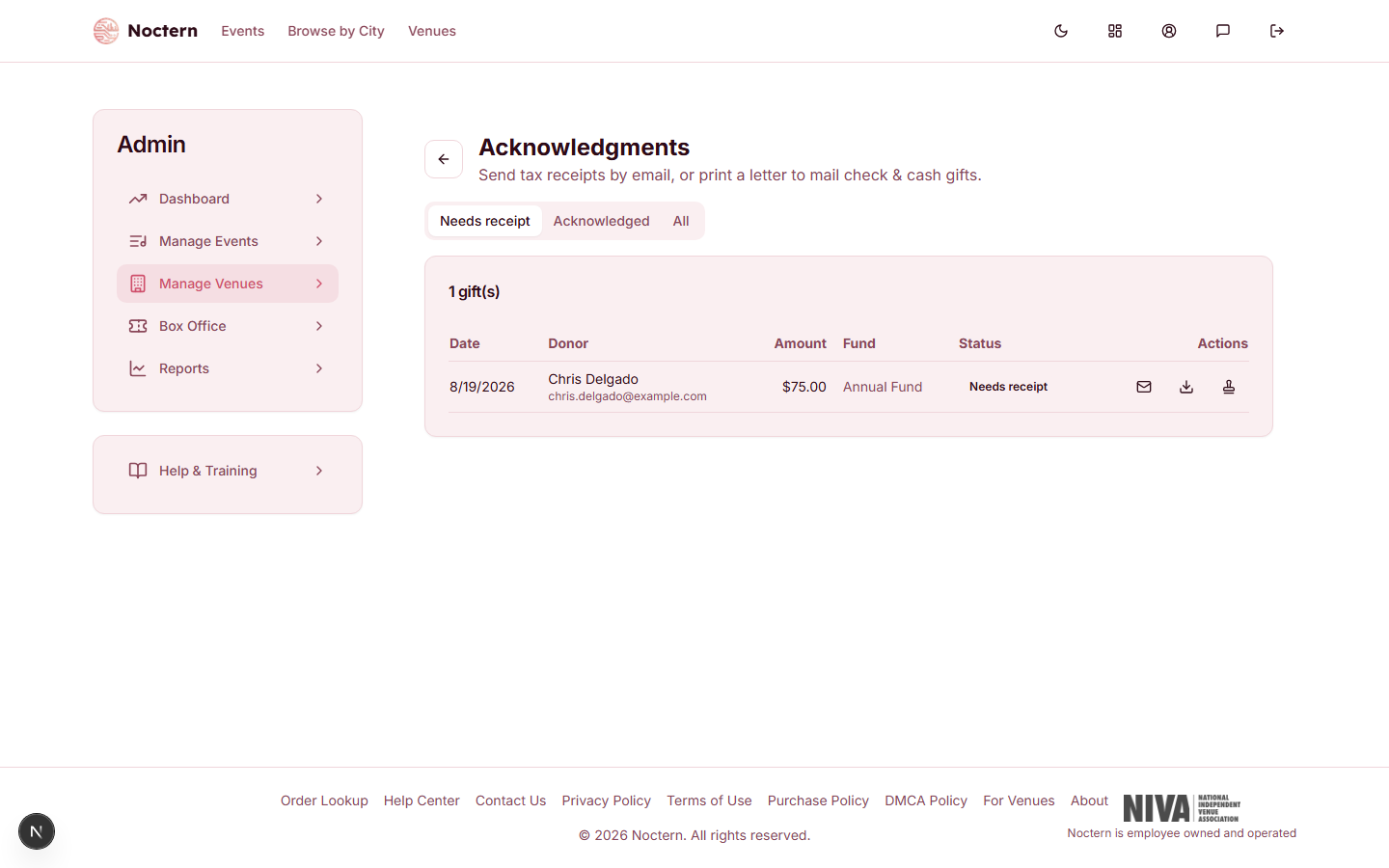
The Needs receipt tab is where you'll spend your time — it opens by default and lists every completed gift that hasn't been acknowledged yet. Switch to Acknowledged or All to review what's already gone out.
For a gift with an email on file, click the mail icon to Email receipt. The receipt is sent straight away and the gift moves to Acknowledged. If the donor has no email, the row reads "no email on file" and that icon is disabled — use the download icon to Download PDF letter and mail it instead.
Once you've mailed a printed letter, click the stamp icon to Mark letter sent so it drops out of the queue. Downloading the PDF does not do this for you — a gift stays under Needs receipt until you email it or mark the letter sent.
The Status column shows Needs receipt, or how the gift was acknowledged: Email, Letter, or Both when it has been emailed and also marked as mailed. All three actions stay available on acknowledged gifts, so you can re-send a receipt or print a second copy at any time.
When the queue is empty, it says so plainly — every completed gift has been acknowledged.
There's no batch "acknowledge all" action today — every gift is emailed or marked sent one at a time. Budget for that if your venue records gifts in large batches (a mail appeal response, for example), and for sustainers, whose monthly installments each arrive here.
Each tab lists at most the 200 most recent gifts. If you have a longer backlog, work it down and older gifts move into view.
What the receipt says
The emailed receipt and the PDF letter carry the same wording; the PDF is headed "Charitable Contribution Receipt" under your organization's name. Each one includes:
- A thank-you line with the gift amount, your organization's name, the gift date (in your venue's time zone), and the fund.
- The gift amount. If the donor covered the card processing fee, that fee is shown on its own line marked "not tax-deductible".
- The tax-deductible amount. When the gift was recorded with a fair-market value of goods or services received, the receipt states that value and the reduced deductible portion.
- For a recurring gift, a note that it continues until cancelled and who to contact to change it.
- The receipt number when the gift has one, your EIN if one is saved, and your Donation Receipt Statement if one is saved.
Customizing the receipt language
Three settings shape every receipt, all on AdminVenuesEdit (the Edit details link on the venue hub):
- 501(c)(3) Legal Name (in the Nonprofit Settings card) — the organization name used throughout. Your venue name is used when none is saved.
- Donation Receipt Statement (same card) — your closing wording, printed word for word at the end of the receipt.
- EIN (Optional) (in the Venue Details card) — printed after your organization's name when saved.
See Nonprofit settings for each field.
Noctern adds no standard disclosure to an acknowledgment. With no Donation Receipt Statement saved, the receipt still states the tax-deductible amount, but it carries no "no goods or services were provided" sentence and no 501(c)(3) wording. If your receipts need that language, save it in the statement. (Year-end statements are different — they fall back to a standard sentence.)
Watch out
Soft-credited patrons are never sent an acknowledgment for the gift they were credited on — only the hard-credit donor is. If a soft-credit recipient also gave their own gift, that gift gets its own acknowledgment normally.
- Open the demo venue's Acknowledgments queue and find the unacknowledged gift on the Needs receipt tab.
- Click the mail icon and confirm the receipt is sent (or note that it's disabled if the donor has no email).
- Check the Acknowledged tab afterward to confirm the gift moved.