
Mistakes happen — a check amount misread at entry, a gift logged twice. Edit and Void fix that from the gift's own row, on either the patron's Giving tab or the venue-wide Gifts ledger.
Before you start
Venue Admin. Editing and voiding a gift has no permission of its own — any venue admin on the venue can do it, and box office staff cannot. In practice you also need the Donor data permission (set on the Team page), because the Gifts ledger and the patron's Giving tab — the only places the buttons appear — don't load without it.
Editing a gift
Go to AdminVenuesFundraisingGifts (the page is titled Gifts ledger), or a patron's Giving tab, and click Edit on a gift row.
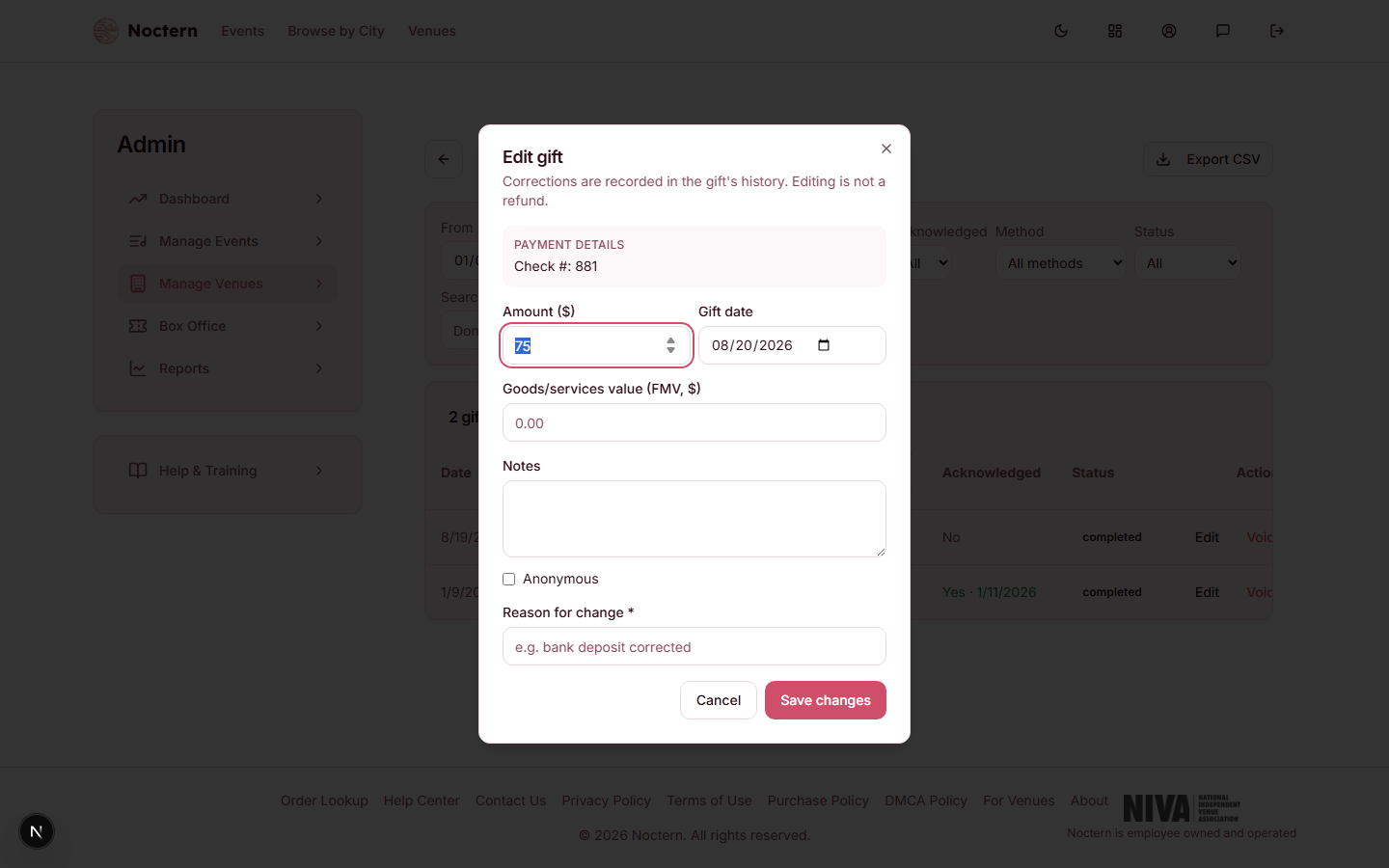
Update the fields you need to correct: Amount ($), Gift date, Goods/services value (FMV, $), Notes, or Anonymous. The fund, appeal, and donor can't be changed from this dialog.
Enter a Reason for change — this is required for every edit.
Click Save changes.
Amount is locked for card gifts and ticket-refund gifts. If a gift came in by card, Stripe is the source of truth for the amount — correct it with a refund instead of editing the dollar figure here. A gift created by converting a ticket refund is fixed at the refunded ticket value. The other fields can still be edited on both.
Every edit or void is added to the gift's history. Once a gift has been changed at least once, a History button appears on its row — open it to see each change's timestamp, whether it was an edit or a void, the account that made it (shown as an account ID, not a name), the reason, and the before/after values.
Voiding a gift
Click Void on the gift row.
Enter a Reason — required.
Click Void gift.
Voiding is not a refund — no money moves. It removes the gift from the patron's totals and from year-end statements, which is exactly right for a duplicate entry, but wrong for an actual gift the donor wants back. If money needs to move, process a refund instead. A void can't be undone from this screen — re-record the gift if you voided the wrong one.
Watch out
Only a completed or pending gift can be edited or voided. A refunded, disputed, or already-voided gift is locked — its row shows no Edit or Void button.
Editing a gift's date across a tax-year boundary is blocked once a year-end statement has already been emailed to that patron for either year. Void the gift and re-record it in the correct year instead.
Editing or voiding never changes accounting records automatically. Gifts you recorded by hand (check, cash, in-kind) are not sent to QuickBooks in the first place. For a card gift that was already posted to the books, changing its date — or voiding it — flags it for a manual accounting adjustment rather than re-posting it.
- Open the demo venue's Gifts ledger and click Edit on a check or cash gift.
- Try leaving the Reason field blank and confirm the save is rejected.
- Open History on a gift that's already been edited once and read its revision.