
A sustainer is a donor giving on a recurring schedule via a Stripe subscription — monthly, quarterly, twice a year, or yearly. Sustainers are set up from the public donate page; staff manage them from the admin list, and donors can manage their own from their profile.
Before you start
Each action has its own gate, all set on the Team page:
- Venue Admin with the Donor data permission to open the sustainers list.
- Change amount needs nothing beyond being a venue admin who can open the list.
- Cancelling a sustainer needs the Refunds permission (
canRefund) — that permission's description on the Team page reads "Refund tickets and cancel recurring gifts".
The venue owner has every permission. Box office staff can't open this page.
The sustainers list
Go to AdminVenuesFundraisingSustainers.
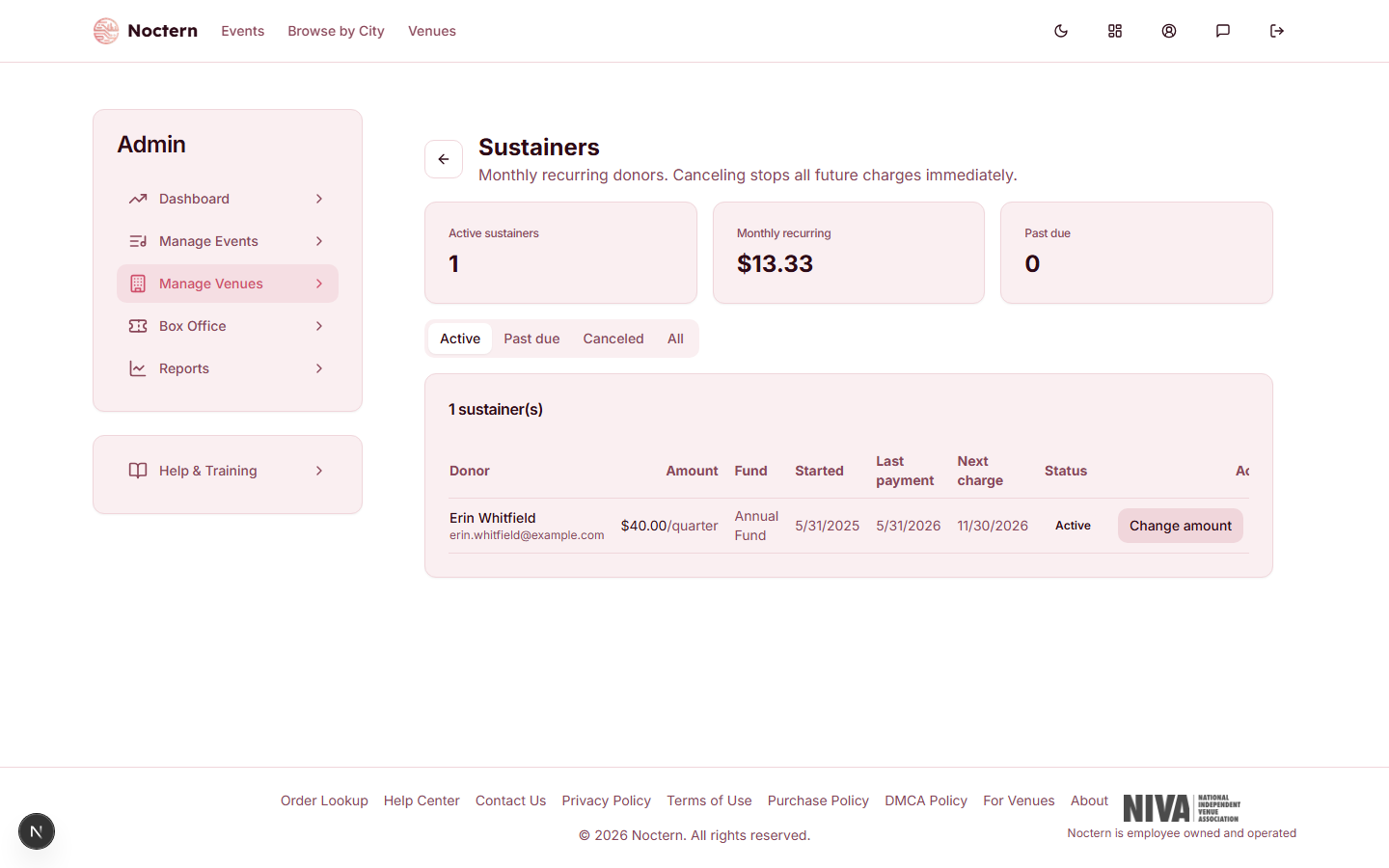
Summary cards at the top show Active sustainers, Monthly recurring (every active gift converted to a per-month figure), and Past due. The table lists Donor, Amount, Fund, Started, Last payment, Next charge, Status, and Actions, filterable by the Active / Past due / Canceled / All tabs. Next charge shows a date for active gifts only; a past-due gift shows a dash, and its status carries a "×2"-style count of failed attempts.
Click Change amount on an active or past-due row and type the new gift amount (between $1 and $10,000) in the prompt. The new amount applies from the next charge — nothing is charged or credited for the current period. If the donor chose to cover processing fees, the fee portion is recalculated for the new amount.
Click the ✕ icon at the end of the row, read Cancel this recurring gift?, and click Cancel gift (or Keep it to back out). No further charges are made, and it cannot be undone — the donor would need to set up a new recurring gift.
Donor self-service
Donors manage their own recurring gifts at Profile → My Giving, under Recurring gifts. Each card shows the organization, amount, how often, fund, and either the next charge date, "Payment past due", or "Canceled", plus the card brand and last four digits on file.
Donors can Update card, Change amount, or Cancel their own gift from there, without contacting you. The same page lists their past gifts and lets them download year-end statements.
Watch out
Say "Twice a year" for a gift charged every six months — that's the label donors see on the donate page and on My Giving. "Semi-annual" doesn't appear anywhere in the product. In the admin list the amount is shown as "$50.00/6 mo".
When you cancel from this list, the gift is marked Canceled right away. A cancellation that happens on Stripe's side — such as one caused by repeated failed payments — shows up here only after Stripe notifies Noctern, so the list can briefly lag. Stripe is the source of truth for whether a sustainer is still active.
- Open the demo venue's Sustainers list and find the active sustainer's Next charge date.
- Open Profile → My Giving as a donor account and compare what the donor sees to what staff see in the admin list.