
Interactive Demo
Select seats with precision
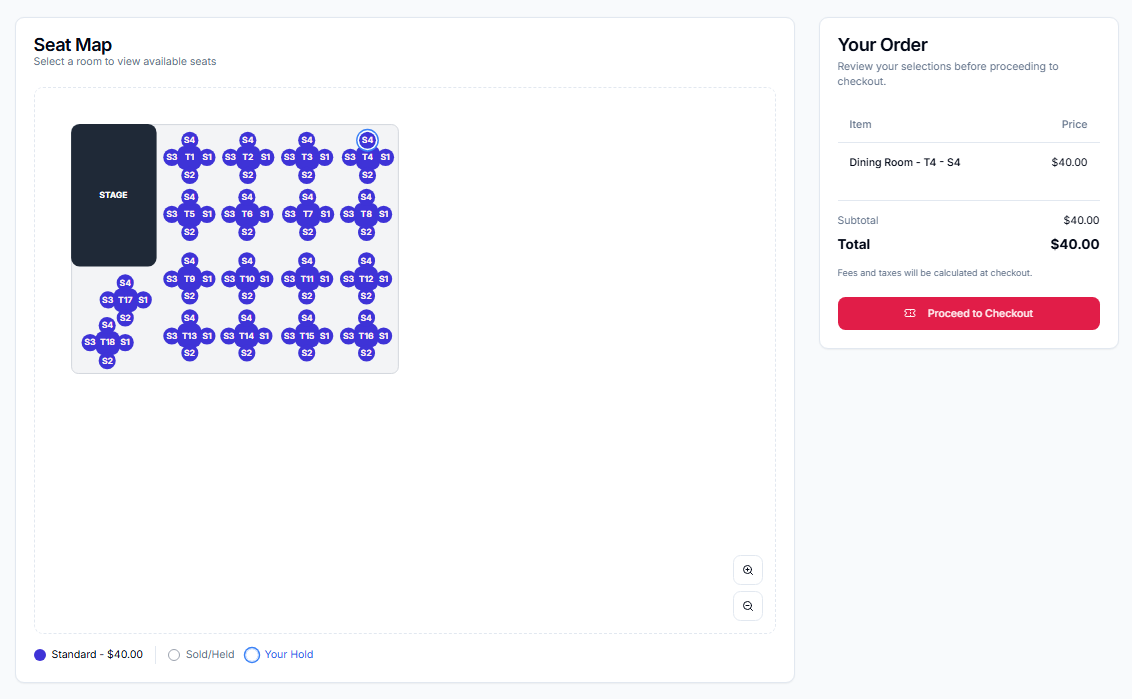
Click the highlighted areas to zoom, choose seats, and proceed to pay.
Current task
Zoom in or out to find your section
Use the zoom controls to get a clear view of the seat map.
What to click
Click the zoom controls in the bottom-right corner of the seat map.
How to Buy Tickets
The ticket purchase process is quick and secure.
Steps
- 1
Select an event from search or event details page
- 2
Choose your seats from the interactive seat map
- 3
Review your selection (quantity, price, fees)
- 4
Proceed to checkout and choose payment method
- 5
Enter payment details (credit card, digital wallet, etc.)
- 6
Review your order summary
- 7
Confirm purchase
💡 Tips
- •Seats are held for 15 minutes during checkout
- •Check for available discounts or promotional codes
- •You'll receive a confirmation email immediately
Selecting Seats
Pick your favorite seats from the venue map.
Steps
- 1
Seat colors indicate pricing tiers based on the legend
- 2
Click seats to select them (a circle marks your selections)
- 3
Click again to deselect a seat
- 4
The price updates as you select/deselect seats
- 5
Some venues may have restricted view seats marked differently
💡 Tips
- •Use the legend to compare prices by color
- •Group contacts need to sit together? Select adjacent seats
Payment Options
We accept multiple payment methods for your convenience.
Steps
- 1
Credit Cards: Visa, Mastercard, American Express, Discover
- 2
Digital Wallets: Apple Pay, Google Pay
💡 Tips
- •All transactions are encrypted and secure
- •Save payment methods for faster checkout next time